Your Supabase project is already a spatial server: OGC API Features from PostGIS with one Edge Function
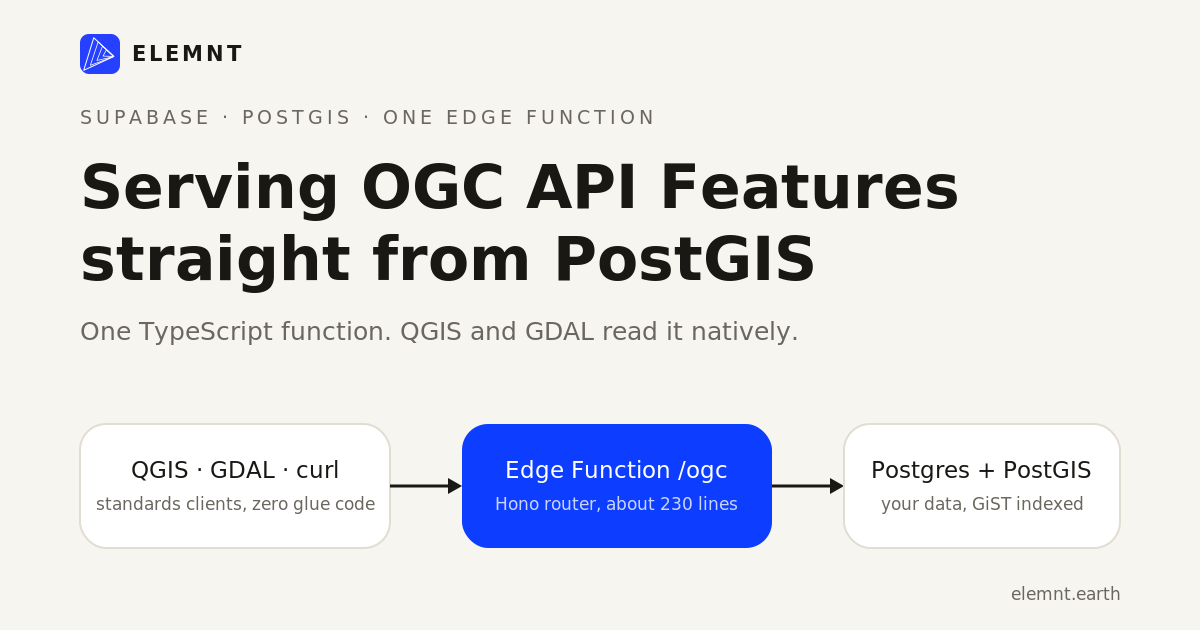
A hands-on guide. Enable PostGIS, keep the data where it already lives in Supabase Postgres, and put a standards-compliant features API in front of it with a single TypeScript Edge Function. QGIS and GDAL will read it with zero custom client code.
ELEMNT Datastore· ~15 min read
The ticket usually arrives sideways. Your product has been storing locations in Postgres all along, because Supabase made that the path of least resistance. Then an analyst, a partner, or a city GIS team asks for the data "as a proper feed we can load into QGIS." The old reflex was to stand up GeoServer or MapServer, learn its config dialect, and accept that you now babysit one more service forever.
There is a shorter path, and it exists because of two facts:
- Supabase Postgres speaks PostGIS. Enable one extension and your database has indexable geometry types and the full spatial SQL toolbox.
- The modern standard for serving vector features, OGC API Features, is deliberately boring. Plain HTTP. Plain JSON. GeoJSON for the payloads. No XML envelopes, no
GetCapabilitiesceremony.
A standard that is just HTTP plus JSON is a standard you can implement in a serverless function. This post builds it end to end: one PostGIS table, one Supabase Edge Function, and at the end QGIS connects to your project like it would to any national mapping agency's API.
What you need to follow along: a Supabase project (the free tier is fine), the Supabase CLI, curl, and optionally QGIS or GDAL for the payoff at the end.
What OGC API Features actually is
OGC API Features is the OGC's successor to WFS, approved in 2019 and built on the patterns web developers already use: resources, JSON, OpenAPI, links with rel attributes. Part 1 (Core) is the read-only piece, and it asks a server to expose a small set of predictable resources:
| Path | What it returns |
|---|---|
/ | Landing page: a JSON document of links to everything else |
/conformance | The list of conformance classes the server implements |
/collections | The datasets on offer |
/collections/{collectionId} | Metadata for one dataset, including its spatial extent |
/collections/{collectionId}/items | The features themselves, as a GeoJSON FeatureCollection, filterable by bbox and pageable by limit |
/collections/{collectionId}/items/{featureId} | One feature |
That is the whole surface for Core. Geometries travel as GeoJSON in CRS84 (longitude, latitude), and the spec's documented default page size is 10 features per request.
The reason to care is not the spec document. It is the client ecosystem. QGIS ships a native OGC API Features client in its data source manager. GDAL has the OAPIF vector driver, which means ogr2ogr and everything built on it can read your endpoint. Implement the server side once and an entire toolchain you did not write becomes your client library. That is what a standard buys you, and it is why "can we get this as OGC API Features?" keeps showing up in data-sharing agreements and government procurement checklists.
What we will build
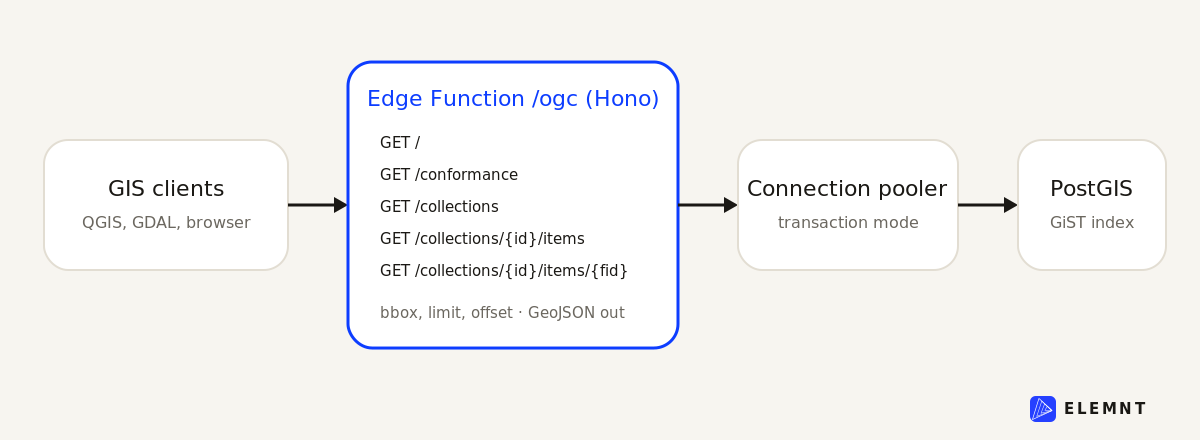
One Edge Function named ogc, containing:
- Hono for routing, the lightweight web framework Supabase's own docs recommend for multi-route functions
- postgres.js for talking to the database through Supabase's connection pooler
- a small collection registry: a hardcoded allowlist that maps collection ids to tables, which doubles as the security boundary
The function is read-only by design. Five routes, no state, no ORM, and nothing to install on the database side beyond PostGIS itself.
Step 1: turn on PostGIS and lay out a table
In the Supabase dashboard, go to Database, then Extensions, search for postgis, and enable it. Or do it in SQL:
create extension if not exists postgis;If the dashboard offers to install the extension into a dedicated schema, accept it. Just make sure that schema is on your database search_path (Supabase handles this for its default extension schema), or schema-qualify the ST_* calls that follow.
Now a working table. The example dataset is bike share stations: points with a couple of attributes, the shape of half the operational data in the world.
create table public.bike_stations (
  id bigint generated always as identity primary key,
  name text not null,
  capacity int not null default 0,
  is_active boolean not null default true,
  geom geometry(Point, 4326) not null
);

-- A GiST index is what makes bbox filtering index-assisted instead of a scan
create index bike_stations_geom_idx
  on public.bike_stations using gist (geom);

alter table public.bike_stations enable row level security;
create policy "public read" on public.bike_stations
  for select to anon, authenticated using (true);

insert into public.bike_stations (name, capacity, geom) values
  ('Riverside Gate', 24, ST_SetSRID(ST_MakePoint(18.0686, 59.3293), 4326)),
  ('Old Market',     16, ST_SetSRID(ST_MakePoint(18.0710, 59.3326), 4326)),
  ('Harbor Loop',    32, ST_SetSRID(ST_MakePoint(18.0823, 59.3270), 4326));
Three choices worth a sentence each:
geometry(Point, 4326)pins the column to WGS84 longitude/latitude, which is what GeoJSON and the CRS84 default of OGC API Features expect. Store in 4326 and you never reproject on the way out.- The GiST index is not optional decoration. The
bboxquery parameter we implement later compiles down to the&&bounding-box operator, and GiST is what makes that an index lookup. - The RLS policy is there for honesty: our Edge Function will connect over a privileged direct connection that is not subject to RLS, so the function itself is the trust boundary for this API. But the same table is also reachable through Supabase's auto-generated REST API, and an explicit read policy makes that door safe too instead of accidentally open.
Step 2: scaffold the function
supabase functions new ogcOne configuration decision before any code: this API should be public. By default, Supabase Edge Functions reject requests without a valid JWT, and QGIS or GDAL will not be sending your project's anon key. Turn verification off for this function in supabase/config.toml:
[functions.ogc]
verify_jwt = false
The function is still read-only over an allowlist, so "public" means exactly what it should: anyone can read the collections you chose to publish, and nothing else.
Step 3: the function, top to bottom
Everything below lives in one file, supabase/functions/ogc/index.ts. The blocks appear here in file order, so you can paste them in sequence and end up with the complete function.
Setup and the collection registry
import { Hono } from 'jsr:@hono/hono'
import { cors } from 'jsr:@hono/hono/cors'
import type { Context } from 'jsr:@hono/hono'
import postgres from 'npm:[email protected]'

// SUPABASE_DB_URL is injected automatically, both locally and in production.
// prepare: false because the pooled connection runs in transaction mode.
const sql = postgres(Deno.env.get('SUPABASE_DB_URL')!, { prepare: false })

const FN = 'ogc' // Edge Functions see paths prefixed with the function name
const app = new Hono().basePath(`/${FN}`)
app.use('*', cors())

const GEOJSON = 'application/geo+json'
const CRS84 = 'http://www.opengis.net/def/crs/OGC/1.3/CRS84'
const DEFAULT_LIMIT = 10
const MAX_LIMIT = 1000

type CollectionDef = {
  table: string      // only tables in this registry are reachable
  idColumn: string   // primary key column
  geomColumn: string // geometry column, SRID 4326
  title: string
  description: string
}

const collections: Record<string, CollectionDef> = {
  bike_stations: {
    table: 'bike_stations',
    idColumn: 'id',
    geomColumn: 'geom',
    title: 'Bike share stations',
    description: 'Docking stations for the city bike share, with capacity.',
  },
}
The registry is the most important block in the file. Collection ids arrive from the URL, untrusted. They are only ever used as keys into this object, and the table and column names that reach SQL come from the object's values, which you wrote. That one indirection is the whole defense against SQL injection through identifiers. To publish another table, add an entry; there is no other registration step.
Helpers, landing page, conformance
const baseUrl = (req: Request) => {
  const url = new URL(req.url)
  return `${url.origin}/functions/v1/${FN}`
}

const geojson = (body: unknown) =>
  new Response(JSON.stringify(body), {
    headers: { 'content-type': GEOJSON },
  })

const oops = (c: Context, status: number, description: string) =>
  c.json({ code: String(status), description }, status as 400)

app.get('/', (c) => {
  const base = baseUrl(c.req.raw)
  return c.json({
    title: 'City open data',
    description:
      'A minimal OGC API Features service backed by Supabase Postgres + PostGIS.',
    links: [
      { href: base, rel: 'self', type: 'application/json', title: 'This document' },
      { href: `${base}/conformance`, rel: 'conformance', type: 'application/json', title: 'Conformance declaration' },
      { href: `${base}/collections`, rel: 'data', type: 'application/json', title: 'Feature collections' },
    ],
  })
})

app.get('/conformance', (c) =>
  c.json({
    conformsTo: [
      'http://www.opengis.net/spec/ogcapi-features-1/1.0/conf/core',
      'http://www.opengis.net/spec/ogcapi-features-1/1.0/conf/geojson',
    ],
  }))
Two things are deliberate here. The landing page is not decoration: OGC API clients start at / and follow links by rel, the way a browser follows anchors, so those three links are what makes the service discoverable. And the conformance list declares only core and geojson. There is a third common class, oas30, for servers that publish an OpenAPI definition. We do not, so we do not claim it. Clients read this list to decide what to attempt; declaring only what you implement is what keeps them working.
Collections and the extent trick
async function collectionMeta(id: string, def: CollectionDef, base: string) {
  const [row] = await sql`
    select array[ST_XMin(e.b), ST_YMin(e.b), ST_XMax(e.b), ST_YMax(e.b)] as bbox
    from (
      select coalesce(ST_Extent(${sql(def.geomColumn)})::geometry,
                      ST_MakeEnvelope(-180, -90, 180, 90, 4326)) as b
      from ${sql(def.table)}
    ) e
  `
  return {
    id,
    title: def.title,
    description: def.description,
    itemType: 'feature',
    crs: [CRS84],
    extent: { spatial: { bbox: [row.bbox], crs: CRS84 } },
    links: [
      { href: `${base}/collections/${id}`, rel: 'self', type: 'application/json' },
      { href: `${base}/collections/${id}/items`, rel: 'items', type: GEOJSON, title: def.title },
    ],
  }
}

app.get('/collections', async (c) => {
  const base = baseUrl(c.req.raw)
  const list = await Promise.all(
    Object.entries(collections).map(([id, def]) => collectionMeta(id, def, base)),
  )
  return c.json({
    collections: list,
    links: [{ href: `${base}/collections`, rel: 'self', type: 'application/json' }],
  })
})

app.get('/collections/:collectionId', async (c) => {
  const id = c.req.param('collectionId')
  const def = collections[id]
  if (!def) return oops(c, 404, `No collection '${id}'`)
  return c.json(await collectionMeta(id, def, baseUrl(c.req.raw)))
})
${sql(def.table)} is postgres.js identifier interpolation: the library quotes it as an identifier, and the value comes from the registry, never from the URL. The collection metadata computes its spatial extent live with ST_Extent, and the coalesce keeps an empty table from producing a null extent (clients dislike that). QGIS uses this bbox to zoom to the layer the moment you add it.
The main event: items, with bbox and paging
app.get('/collections/:collectionId/items', async (c) => {
  const id = c.req.param('collectionId')
  const def = collections[id]
  if (!def) return oops(c, 404, `No collection '${id}'`)

  const q = c.req.query()
  const limit = Math.min(
    Math.max(Number.parseInt(q.limit ?? '', 10) || DEFAULT_LIMIT, 1),
    MAX_LIMIT,
  )
  const offset = Math.max(Number.parseInt(q.offset ?? '', 10) || 0, 0)

  let where = sql`true`
  if (q.bbox) {
    const part = q.bbox.split(',').map(Number)
    if (part.length !== 4 || part.some(Number.isNaN)) {
      return oops(c, 400, 'bbox must be minLon,minLat,maxLon,maxLat')
    }
    where = sql`${sql(def.geomColumn)} &&
      ST_MakeEnvelope(${part[0]}, ${part[1]}, ${part[2]}, ${part[3]}, 4326)`
  }

  const [{ matched }] = await sql`
    select count(*)::int as matched
    from ${sql(def.table)} where ${where}
  `

  const rows = await sql`
    select jsonb_build_object(
      'type', 'Feature',
      'id', t.${sql(def.idColumn)},
      'geometry', ST_AsGeoJSON(t.${sql(def.geomColumn)}, 7)::jsonb,
      'properties', to_jsonb(t) - ${def.geomColumn} - ${def.idColumn}
    ) as feature
    from ${sql(def.table)} t
    where ${where}
    order by t.${sql(def.idColumn)}
    limit ${limit} offset ${offset}
  `

  const base = baseUrl(c.req.raw)
  const self = `${base}/collections/${id}/items`
  const qs = (o: number) =>
    `?limit=${limit}&offset=${o}` + (q.bbox ? `&bbox=${q.bbox}` : '')

  const links = [{ href: self + qs(offset), rel: 'self', type: GEOJSON }]
  if (offset + rows.length < matched)
    links.push({ href: self + qs(offset + limit), rel: 'next', type: GEOJSON })
  if (offset > 0)
    links.push({ href: self + qs(Math.max(offset - limit, 0)), rel: 'prev', type: GEOJSON })

  return geojson({
    type: 'FeatureCollection',
    features: rows.map((r) => r.feature),
    numberMatched: matched,
    numberReturned: rows.length,
    timeStamp: new Date().toISOString(),
    links,
  })
})
This is the route GIS clients hammer, and almost every line earns its place:
- The feature is assembled in SQL, not in TypeScript.
jsonb_build_objectplusST_AsGeoJSON(geom, 7)::jsonbbuilds each GeoJSON feature inside Postgres, andto_jsonb(t)minus the geometry and id keys turns the remaining columns intoproperties. Add a column to the table and it appears in the API without touching the function. The7caps coordinate precision at 7 decimal places (about a centimeter), which keeps payloads honest in size. bboxcompiles to&&, the bounding-box overlap operator, which is exactly what the GiST index from Step 1 accelerates. Values are interpolated as bound parameters by postgres.js, so user input never becomes SQL text.count(*)::intmatters in a way that will bite you if you skip it. Postgres counts arebigint, the driver surfaces those as JavaScriptBigInt, andJSON.stringifythrows onBigInt. Cast in SQL and the problem never exists.- Paging is
limitandoffsetwithnextandprevlinks. Clients are told to follow thenextlink rather than construct page URLs, which leaves you free to swap in keyset pagination later without breaking anyone.
One feature, error handling, export
app.get('/collections/:collectionId/items/:featureId', async (c) => {
  const id = c.req.param('collectionId')
  const def = collections[id]
  if (!def) return oops(c, 404, `No collection '${id}'`)
  const fid = c.req.param('featureId')

  const rows = await sql`
    select jsonb_build_object(
      'type', 'Feature',
      'id', t.${sql(def.idColumn)},
      'geometry', ST_AsGeoJSON(t.${sql(def.geomColumn)}, 7)::jsonb,
      'properties', to_jsonb(t) - ${def.geomColumn} - ${def.idColumn}
    ) as feature
    from ${sql(def.table)} t
    where t.${sql(def.idColumn)}::text = ${fid}
    limit 1
  `
  if (rows.length === 0) return oops(c, 404, `No feature '${fid}' in '${id}'`)

  const base = baseUrl(c.req.raw)
  const feature = rows[0].feature
  feature.links = [
    { href: `${base}/collections/${id}/items/${fid}`, rel: 'self', type: GEOJSON },
    { href: `${base}/collections/${id}`, rel: 'collection', type: 'application/json' },
  ]
  return geojson(feature)
})

app.notFound((c) =>
  oops(c, 404, 'Not found. Start at the landing page and follow links.'))

app.onError((e, c) => {
  console.error(e)
  return oops(c, 500, 'Internal error')
})

export default { fetch: app.fetch }
The ::text cast on the id comparison keeps one code path working for bigint and uuid keys alike, at the cost of the primary-key index on this one lookup. For a production service, compare with the key's real type instead.
That is the entire server. The complete file runs to about 230 lines including comments, and there is no step you did not just read.
Step 4: run it, then prove it with clients you did not write
Run the stack and the function locally:
supabase start
supabase functions serve ogc --no-verify-jwt
First, the landing page:
curl -s http://127.0.0.1:54321/functions/v1/ogc | jq .Then the request that exercises everything at once, a bbox filter with a page size:
curl -s "http://127.0.0.1:54321/functions/v1/ogc/collections/bike_stations/items?bbox=18.05,59.32,18.09,59.34&limit=2" | jq .{
"type": "FeatureCollection",
"features": [
{
"type": "Feature",
"id": 1,
"geometry": { "type": "Point", "coordinates": [18.0686, 59.3293] },
"properties": { "name": "Riverside Gate", "capacity": 24, "is_active": true }
}
],
"numberMatched": 3,
"numberReturned": 2,
"timeStamp": "2026-06-10T08:30:00.000Z",
"links": [
{ "rel": "self", "type": "application/geo+json", "href": "..." },
{ "rel": "next", "type": "application/geo+json", "href": "...offset=2..." }
]
}(Output trimmed to the shape that matters: one of the two returned features shown.)
Ship it:
supabase functions deploy ogc --no-verify-jwtYour service now lives at https://<project-ref>.supabase.co/functions/v1/ogc. Now for the payoff, with two clients that have never heard of your app:
QGIS. Open the Data Source Manager, pick "WFS / OGC API - Features", create a new connection, and paste the URL above. QGIS reads the landing page, follows the links, lists bike_stations as a layer, and zooms to the extent your collectionMeta computed. Pan the map and QGIS issues bbox requests against your GiST index. Nobody on the other team needs a line of integration code.
GDAL. Anything built on GDAL can read the endpoint through the OAPIF driver:
ogrinfo -ro "OAPIF:https://<project-ref>.supabase.co/functions/v1/ogc" bike_stations -al -q

# or pull the collection straight into a GeoPackage
ogr2ogr stations.gpkg "OAPIF:https://<project-ref>.supabase.co/functions/v1/ogc" bike_stations
That is the quiet argument for standards in one demo: you wrote a server, and the clients showed up for free.
The honest production notes
This function teaches the spec and will happily serve real traffic for modest datasets. Before you call it production for anything bigger, know what it leaves out:
- It is Core minus a few corners. The
datetimeparameter is not implemented, there is no OpenAPI document at aservice-desclink (which is why we never claim theoas30conformance class), responses are CRS84 only (OGC API Features Part 2 adds CRS negotiation), and there is no HTML encoding of resources. numberMatchedcosts acount(*)per request. Fine at thousands of rows, painful at hundreds of millions. The field is optional in the spec; drop it or cache it when the table gets serious.- Offset paging degrades on deep pages. Because clients follow the
nextlink rather than building URLs, you can swap the implementation for keyset pagination later without breaking anyone. That escape hatch is the reason the spec leans on links. - Add
Cache-Control. Features that change hourly do not need to hit Postgres on every pan. A CDN or even a shortmax-agein front of this function changes the economics. - Connection discipline is the pooler's job, but help it. The
sqlclient sits at module scope, so a warm function instance reuses it across requests instead of reconnecting per request. - If you want this without writing code,
pg_featureserv(a single Go binary from the Crunchy Data team) orpygeoapiwill publish PostGIS tables as OGC API Features from a config file. The point of building it once by hand is knowing there is no magic in the binary. - The spec keeps moving. Part 3 adds CQL2 filtering, and JSON-FG (an OGC standard as of this spring) extends GeoJSON with CRS, temporal, and 3D support. A hand-rolled server means you track all of that yourself.
Where ELEMNT fits
Everything above is the right way to learn what "OGC compliant" actually means: it is a small, sane HTTP contract, and now you have implemented it.
It is also one table, one datastore, one spec part. The production version of this story tends to grow: the same API over MongoDB collections and GeoParquet files, tiles for layers too heavy for GeoJSON, a STAC catalog so people can find the data, caching, metering, and the next spec part someone's procurement checklist requires.
That plumbing is the part ELEMNT ships so you do not have to. ELEMNT speaks OGC API Features natively, and PostGIS is a first-class entry in its bring-your-datastore drivers (alongside MongoDB, BigQuery, GeoParquet, Zarr, Snowflake, and Earth Engine). A Supabase database is Postgres, so the same table you just published by hand is the kind of source you can point ELEMNT at and get the standards surface, tile serving over PMTiles, and a transparent pay-per-use meter with spend caps, without maintaining the function. Git-style versioning for spatial data is on the roadmap for Q4 2026, and we would rather tell you that plainly than imply it ships today.
The takeaway
OGC API Features is small on purpose. Your data is already in a database that speaks spatial. One Edge Function, about 230 lines, turns a Supabase project into a feed that QGIS, GDAL, and every other standards-aware client can read without integration work. Build it once by hand; after that, you will know exactly what you are buying when a platform offers to do it for you.
¹ Disclosure: ELEMNT is pre-launch with no published customer deployments. Statements about ELEMNT's capabilities reflect its published architecture; roadmap dates (versioning, Q4 2026) are plans, not shipped features. All third-party technical claims are sourced below.
Sources: OGC API - Features - Part 1: Core (17-069r4), Supabase PostGIS guide, Supabase Edge Functions: routing, Supabase Edge Functions: connecting to Postgres, Supabase function configuration, GDAL OAPIF driver, pg_featureserv, OGC JSON-FG announcement.
What is ELEMNT?
ELEMNT is the cloud-native geospatial data platform — open formats (PMTiles, COG, Zarr, GeoParquet) served straight from object storage, OGC API-compliant, with transparent pay-per-use pricing and no vendor lock-in. From a single project to a billion tiles. Earth Traffic is one demo of what it can do.