How to build a PMTiles archive: tippecanoe to generate, go-pmtiles to ship
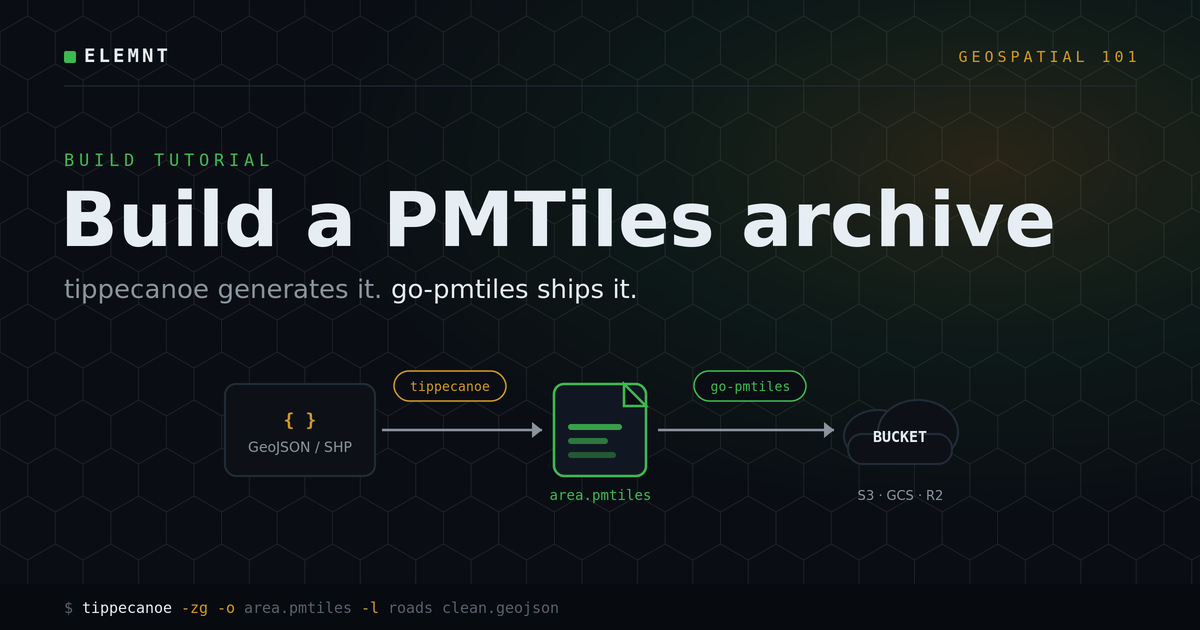
A hands-on guide. Take a GeoJSON or Shapefile, turn it into one map-ready file with tippecanoe, then verify, upload, and serve it with go-pmtiles. No tile server anywhere in the loop.
ELEMNT Engineering· ~10 min read
In the last post we covered what PMTiles is: one indexed file that holds an entire tile pyramid, served straight from cheap storage over HTTP range requests. This post is the how. By the end you will have taken raw vector data and produced a single .pmtiles file sitting in a bucket, ready for a map to read.
You only need two open-source tools, and both are single binaries with no service to run.
- tippecanoe, maintained by Felt, generates the archive from your data.
- go-pmtiles (the
pmtilescommand), from Protomaps, inspects, verifies, uploads, and can serve it.
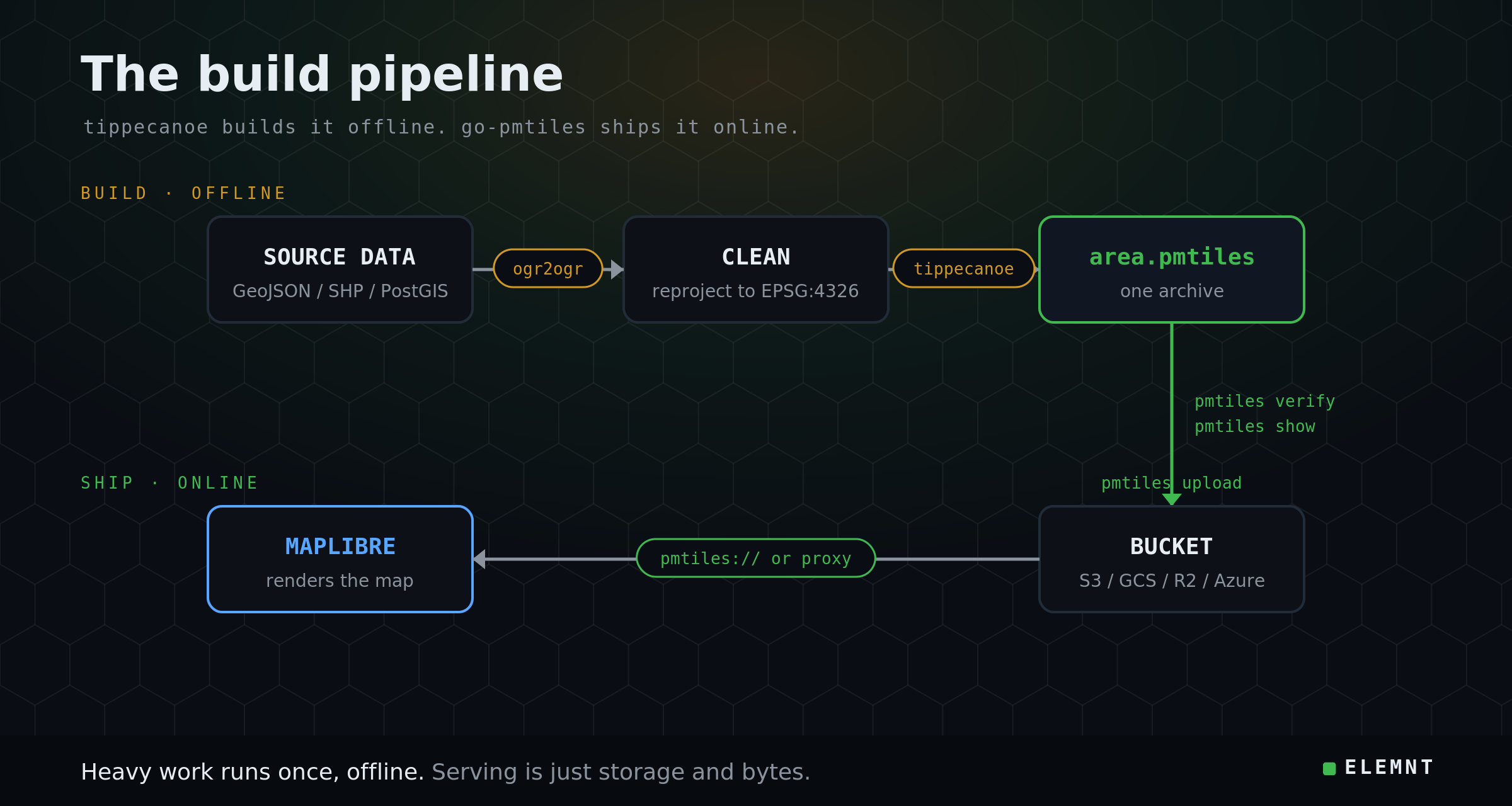
That split is the whole workflow: tippecanoe builds, go-pmtiles ships.
Step 0: Install the tools
tippecanoe builds from source on Linux and macOS, and there is a Docker image at felt/tippecanoe. On macOS, brew install tippecanoe is the fastest path. For go-pmtiles, download the release binary for your platform from the protomaps/go-pmtiles releases page (or brew install pmtiles, or use the protomaps/go-pmtiles Docker image). Confirm both are on your path:
tippecanoe --version
pmtiles version
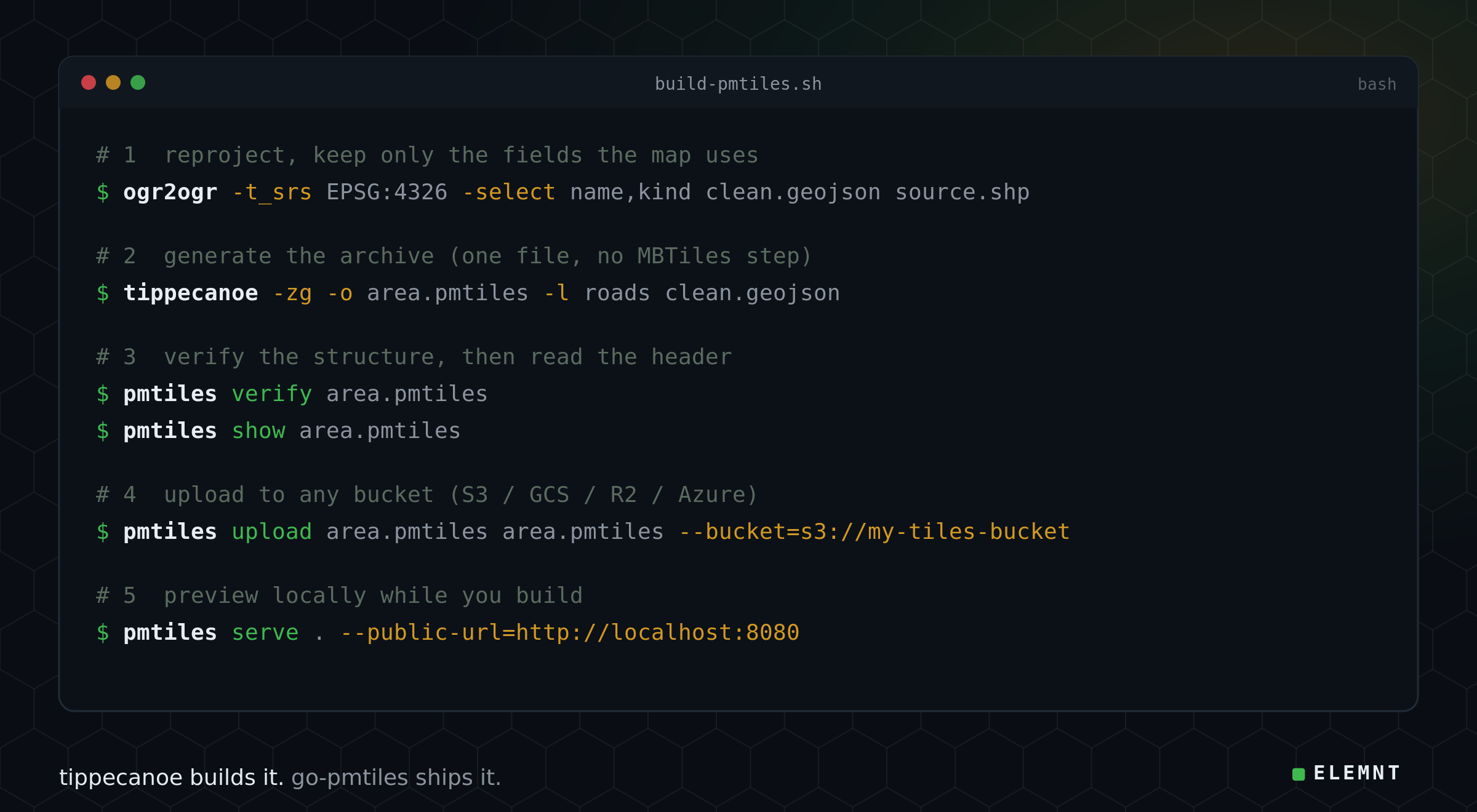
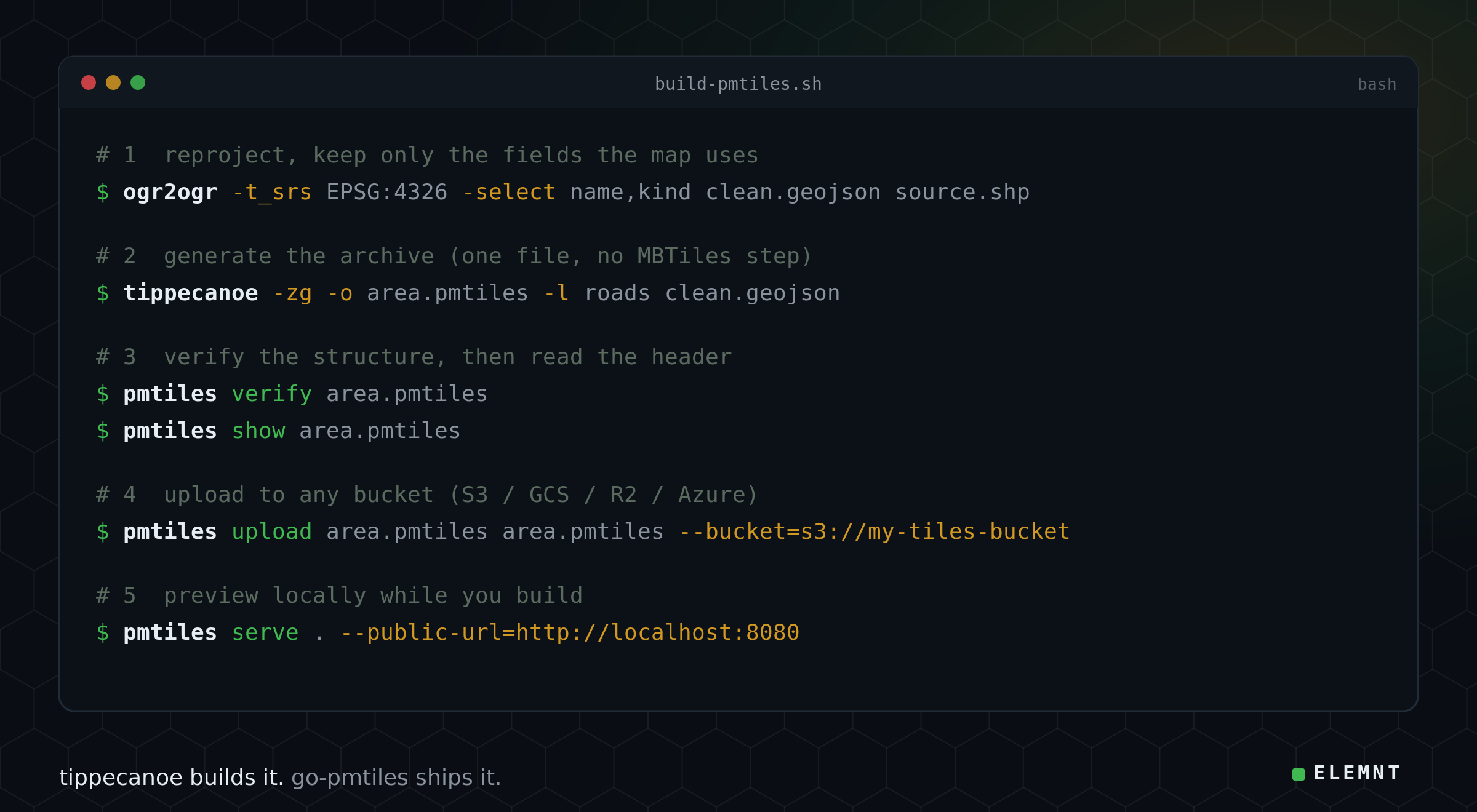
Step 1: Reproject and clean the source
PMTiles archives are built in WGS84 (EPSG:4326), so any projected input needs reprojecting first. This is also the right moment to drop fields the map will not use, because every field you drop shrinks every tile in the archive. GDAL's ogr2ogr handles both in one pass:
ogr2ogr -t_srs EPSG:4326 -select name,kind clean.geojson source.shpHere -t_srs EPSG:4326 reprojects, and -select keeps only the two attributes the style actually reads. Everything else is left behind.
Step 2: Generate the archive with tippecanoe
tippecanoe has written PMTiles directly since version 2.17, so there is no MBTiles intermediate to manage. The output format is chosen by the file extension:
tippecanoe -zg -o area.pmtiles -l roads clean.geojsonThree flags carry most of the work:
-zglets tippecanoe auto-pick the maximum zoom from the data, so feature detail is preserved without over-baking the file. Use-z14instead when you want a fixed, predictable archive size for street-level work.-o area.pmtilesnames the output. The.pmtilesextension is what selects the format.-l roadssets the layer name. This is the exact string a MapLibre style refers to assource-layer, so pick it deliberately.
Two more worth knowing. -r1 -ag keeps all features at all zooms (no point dropping) for thematic layers where everything must appear even when zoomed out. --drop-densest-as-needed is the opposite: a size-budget escape hatch when a dataset is too dense to fit comfortably.
Step 3: Verify and inspect with go-pmtiles
Before the archive leaves your machine, check it. pmtiles verify confirms the file is structurally correct and ordered the way the spec requires. pmtiles show prints the header: bounds, min and max zoom, tile type, and metadata.
pmtiles verify area.pmtiles
pmtiles show area.pmtiles
If show reports the zoom range and bounds you expected, and verify is clean, the archive is good. If the bounds look wrong, the problem is almost always back at Step 1 (a projection that was not actually WGS84).
Step 4: Upload to a bucket
go-pmtiles talks to local files, S3, Google Cloud Storage, Cloudflare R2, and Azure Blob through one --bucket flag, so the same command works whatever your storage is:
pmtiles upload area.pmtiles area.pmtiles --bucket=s3://my-tiles-bucketCredentials follow each cloud's default chain (for AWS, the usual AWS_ACCESS_KEY_ID and AWS_SECRET_ACCESS_KEY or a CLI profile). For very large archives (above roughly 50 GB), rclone copyto with explicit chunk sizes is usually faster and more resilient than a single upload.
Step 5: Preview it locally
While you are still developing, pmtiles serve exposes a directory of archives as classic z/x/y URLs plus a TileJSON endpoint, which is handy for pointing a local MapLibre at the file:
pmtiles serve . --public-url=http://localhost:8080This is a development and reference server. For production traffic you serve the archive either directly to the browser with the pmtiles:// protocol, or through a small proxy. Both keep storage as the only thing holding your data.
Four moves worth keeping nearby
go-pmtiles does more than upload. These four come up constantly:
- Extract a region without downloading the whole planet.
pmtiles extractcarves a bounding box or polygon straight out of a remote archive, reading only the bytes it needs:pmtiles extract https://example.com/planet.pmtiles region.pmtiles --bbox=.... This is the cheapest way to pull one metro area out of a planet build. - Convert from MBTiles. Inherited an MBTiles file from an older toolchain?
pmtiles convert in.mbtiles out.pmtilesdoes it in one command, deduplicating identical tiles automatically. - Cluster legacy output. Archives from tippecanoe, Planetiler, and
pmtiles convertare already clustered. Some other generators are not, which scatters range reads at runtime.pmtiles clusterfixes the layout. - Reach for the right generator at scale. tippecanoe is the recommendation for GeoJSON and Shapefile vector data. For a planet-scale OpenStreetMap build, use Planetiler. For data already living in PostGIS, GDAL's
ogr2ogr -f PMTilesworks directly, though its overview tiles are simpler than tippecanoe's. For raster (GeoTIFF), userio-pmtiles.
Wire it into MapLibre
Register the pmtiles protocol once per page, then point a source at the uploaded file. The source-layer must match the -l name you gave tippecanoe in Step 2:
import { Protocol } from "pmtiles";
maplibregl.addProtocol("pmtiles", new Protocol().tile);

map.addSource("roads", {
  type: "vector",
  url: "pmtiles://https://my-tiles-bucket.s3.amazonaws.com/area.pmtiles",
});
// later: layer uses "source-layer": "roads"
MapLibre reads the archive's header to discover the zoom range automatically, so the style does not need to repeat it.
Where ELEMNT fits
Everything above is open tooling, and that is the point. The archive you just built is portable: it runs from any bucket, behind any CDN, in front of any MapLibre map. ELEMNT is PMTiles-native, so you can hand it exactly this file and it serves straight from object storage behind a global edge, drop-in compatible with MapLibre, with no tile server in the path. On that architecture, ELEMNT's published serving cost works out to about $0.0000141 per tile.¹ Bring your datastore, serve open formats, and self-host any time. Nothing about the file locks you in.
The honest caveats
A few things to keep straight. tippecanoe produces the best overview tiles for vector data, which is why it is the default choice over GDAL for GeoJSON and Shapefiles. Archives are immutable: to update a layer you rebuild and swap the file, so it is worth version-stamping the key (area-v2.pmtiles) and pointing clients at the new name rather than overwriting in place. And PMTiles is a serving format, not an editing database. Build offline, serve online.
That is the entire loop. Raw data in, one verified file out, served for the price of storage and bandwidth.
¹ Per-tile serving cost is ELEMNT's published architecture figure (≈$0.0000141/tile at 50M tiles/month), not a customer-reported result. ELEMNT is pre-launch. Tooling commands and behaviour are from the Protomaps "Creating PMTiles" and pmtiles CLI documentation and the tippecanoe project.
Sources: Creating PMTiles (Protomaps), pmtiles CLI reference (Protomaps), tippecanoe (Felt), go-pmtiles (Protomaps).
What is ELEMNT?
ELEMNT is the cloud-native geospatial data platform — open formats (PMTiles, COG, Zarr, GeoParquet) served straight from object storage, OGC API-compliant, with transparent pay-per-use pricing and no vendor lock-in. From a single project to a billion tiles. Earth Traffic is one demo of what it can do.