Continuous in 3D: Turning 40 Air-Quality Sensors into a Whole Building

A plain-English build log for showing a continuous PM2.5 field through a 10-storey building: why air does not mix the same way up as it does sideways, how anisotropic 3D interpolation fixes the leak between floors, and how to serve the result as interactive vector tiles drawn with MapLibre fill-extrusion.
ELEMNT Engineering· ~15 min read
Picture the job. You have a 10-storey building, roughly 50 metres on a side per floor, and exactly 40 air-quality sensors: four per floor, tucked in from the corners. You want to know the PM2.5 reading not just at those 40 points, but
everywhere: every desk, every stairwell, every gap between sensors, all the way up the building, colored by air-quality index, smooth enough to fly around in a browser.
Forty numbers. A whole building of unknowns. The gap between those two is a classic spatial problem, and the way you close it decides whether the picture is useful or a lie. Here is how to do it honestly, no prior geostatistics required.
The job: a field, not 40 dots
Forty sensors give you 40 dots. What you actually want is a continuous field: a function that returns a plausible PM2.5 value at any coordinate (x, y, z) inside the building's volume. That is spatial interpolation, and the whole game is deciding how much each known sensor should influence each unknown point.
The starting principle is Tobler's First Law of Geography: "everything is related to everything else, but near things are more related than distant things."¹ A sensor three metres from your desk should count for more than one on the far side of the floor. So influence falls off with distance. The question is only: how fast, and measured how?
The math, part one: inverse distance weighting
The simplest honest answer is inverse distance weighting (IDW). Estimate any point as a weighted average of the sensors, where each weight is the inverse of its distance raised to a power p:
            Σ wᵢ · zᵢ                 1
ẑ(x)  =  ─────────── ,     wᵢ  =  ─────────
            Σ wᵢ                   d(x, xᵢ)ᵖ
zᵢ is sensor i's reading, d is its distance to the point you are estimating, and p (usually 2) controls how sharply influence decays. Higher p means nearby sensors dominate harder.
IDW has three properties worth knowing before you ship it. It is an exact interpolator: at a sensor's own location it returns that sensor's value exactly (which is why you must guard the divide-by-zero when distance hits zero, and just return the sensor reading). It is fast and model-free: no training, no fitting, runs in a tight loop. And it is honest about nothing: it gives you a number but no measure of how unsure that number is, and it tends to draw "bull's-eyes," little circular halos, around each sensor. Good enough to start. Not the end of the story.
The math, part two: air does not mix the same way up and sideways
Here is the part that makes a building different from a flat map, and it is the heart of the whole design.
Inside a single floor, air mixes freely in the horizontal plane: no walls between your desk and the window, so a sensor 10 metres away on the same floor genuinely tells you something. But vertically, floors and ceilings get in the way. The sensor three metres above you is on the next floor up, behind a concrete slab. Three metres of vertical separation is, physically, much "further" than three metres of horizontal separation.
Plain Euclidean distance (d = sqrt(dx² + dy² + dz²)) does not know that. Use it and readings bleed between floors, the upper floor's clean air smearing down into the dirty floor below, a smooth gradient where reality has a hard boundary.
The fix is anisotropic distance: stretch the vertical axis so that crossing a floor counts as further than moving across one. Divide the horizontal component by an anisotropy ratio a:
                    ┌  dx² + dy²          ┐
d_aniso(x, xᵢ) = sqrt│  ─────────  +  dz²  │
                    └     a²              ┘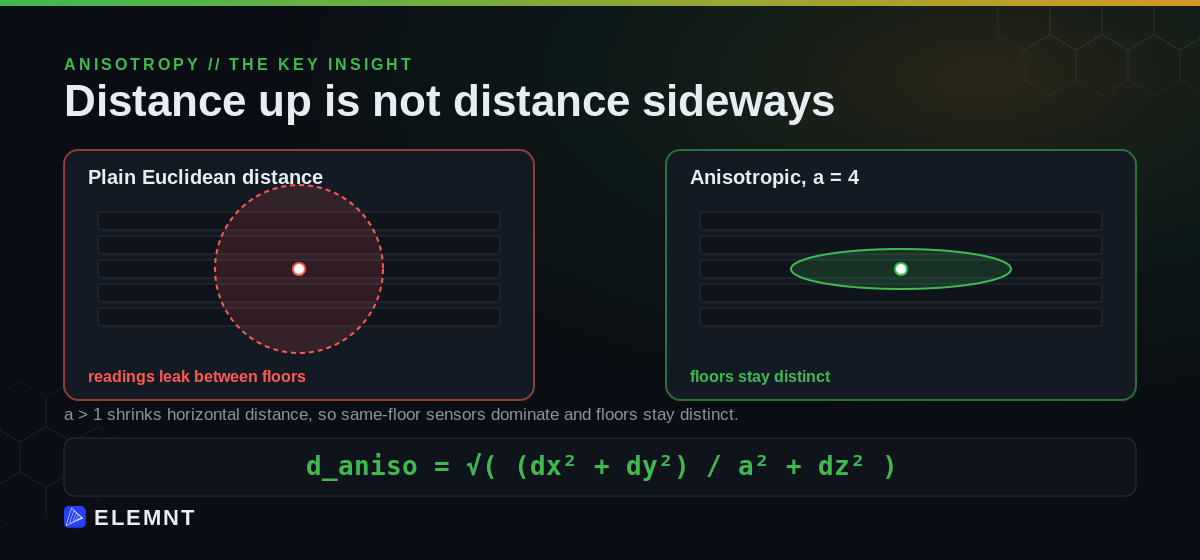
With a > 1, horizontal distances shrink relative to vertical ones. Same-floor sensors reach further and dominate; cross-floor sensors get pushed down in influence. The floors stay distinct, which is what the physics demands. A sensible default for a typical floor plate is a = 4 (horizontal to vertical influence of 4 to 1), and you tune it to how leaky your building actually is. An open atrium wants a lower a; sealed floors with their own air handling want a higher one.
The math, part three: when you need to know how unsure you are
IDW weights come from a fixed formula. The grown-up alternative, ordinary kriging, learns the spatial structure from the data itself. It builds a variogram, γ(h), which measures how much readings differ as a function of how far apart they are, then chooses weights that minimize the variance of the estimation error under an unbiasedness constraint.
The payoff is the one thing IDW cannot give you: kriging variance, a per-point measure of uncertainty. With only four sensors per floor, the middle of each floor is the least-known place in the building, and kriging will tell you exactly that. That map of uncertainty is a sensor-placement plan in disguise: it points at the spots where one more sensor buys the most information. Kriging takes anisotropy too: you set separate horizontal and vertical ranges, the same intuition as the a knob above.
Whichever you pick, validate it. With this few sensors, do leave-one-out cross-validation: drop one sensor, predict its location from the rest, measure the error, repeat for all 40, and report the root-mean-square error. Then sweep p and a and keep the pair that scores best on your data, not on a default someone wrote in a blog post.
import numpy as np

def loocv_rmse(xyz, val, aniso, power):
    errs = []
    n = len(val)
    for i in range(n):
        keep = np.arange(n) != i
        pred = idw_3d(xyz[keep], val[keep], xyz[i:i+1], aniso, power)[0]
        errs.append((val[i] - pred) ** 2)
    return np.sqrt(np.mean(errs))

# Keep the (aniso, power) that actually fits your building.
best = min(
    ((a, p, loocv_rmse(xyz, val, a, p))
     for a in (2, 3, 4, 5, 6) for p in (1.5, 2.0, 2.5, 3.0)),
    key=lambda t: t[2],
)
print("aniso=%.1f power=%.1f rmse=%.2f" % best)
One caveat to say out loud, because it is the honest one: IDW and kriging are statistical and geometric, not physical. Neither simulates airflow, doors opening, the HVAC system, or the stack effect that pulls air up a building. They interpolate between measurements; they do not model the physics that produced them. If you need true accuracy, pair this with a computational fluid dynamics model, or go 2.5D (interpolate each floor in plan, then connect the floors), which respects the building's structure more than a single 3D blob ever will. What you are building here is a fast, honest, continuously-updating picture, not a physics engine.
From a grid of numbers to something a browser can draw
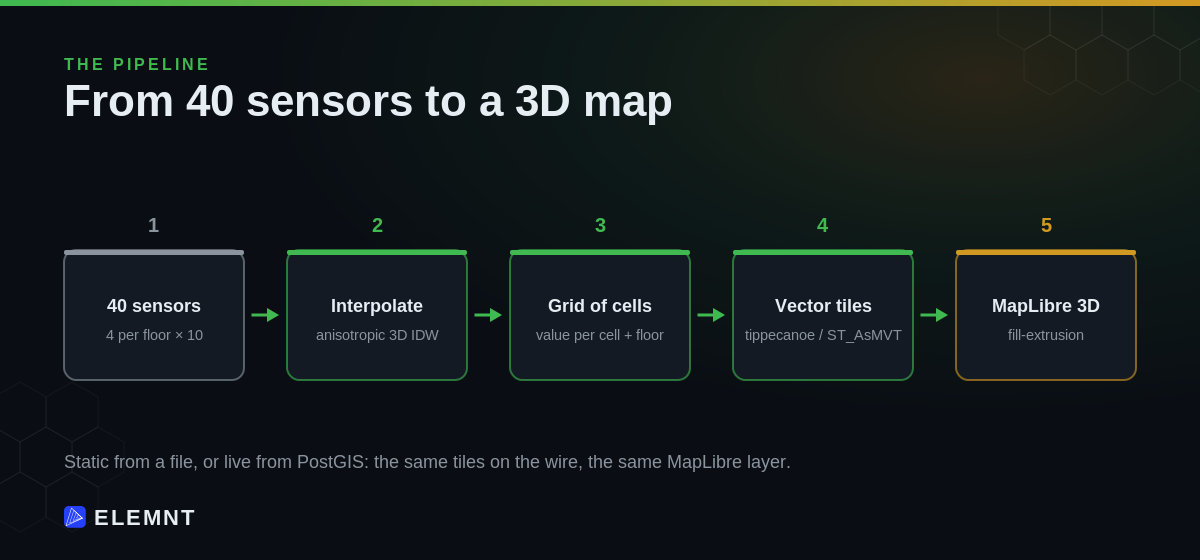
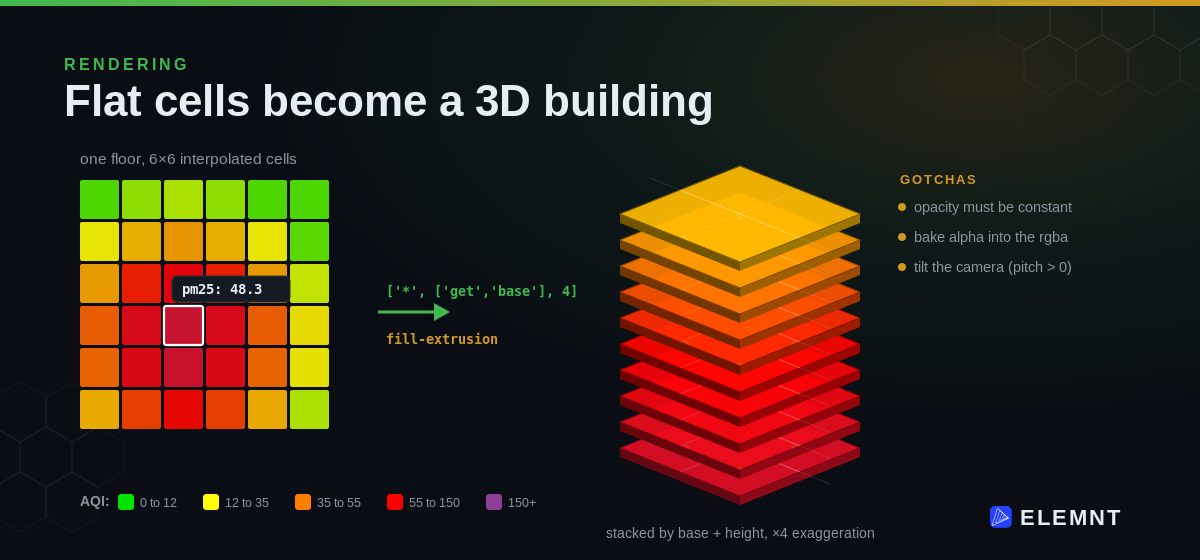
Run the interpolation over a grid of cells (say six by six per floor, at the centre of each cell) and you have a value per cell, per floor. Now you have to draw it. The first fork in the road decides everything downstream: raster or vector tiles?
Render to raster and you bake colors into pixels on the server. Every time you want to change the AQI thresholds, recolor the scale, or let a user click a cell, you rebuild the images. Render to vector tiles and the geometry and the values travel to the browser together, which buys three things that matter here:
- Dynamic styling on the client. Change the color ramp or the AQI cutoffs in the browser, instantly, with no new tiles generated.
- Interactivity. Hover or click any cell to read its exact value, because each cell is a real feature carrying its
pm25attribute, not a dead pixel. - 3D extrusion. A vector polygon can be raised into a block whose base and height come from its attributes, which is exactly how you stack floors into a building.
The numbers are small and the structure is open, so vector tiles win cleanly. The only question left is how to produce them.
The interpolation, vectorized
First, the core. Here is the anisotropic 3D IDW from above, written to run over a whole grid at once with NumPy instead of looping point by point. This is the version you want in a server-side pipeline.
import numpy as np

def idw_3d(sensors_xyz, sensors_val, grid_xyz, aniso=4.0, power=2.0):
    """
    sensors_xyz : (n, 3) sensor positions (x, y, z) in metres
    sensors_val : (n,)   PM2.5 reading at each sensor
    grid_xyz    : (m, 3) points to estimate
    returns     : (m,)   estimated PM2.5
    """
    # Every grid-point-to-sensor vector: shape (m, n, 3)
    diff = grid_xyz[:, None, :] - sensors_xyz[None, :, :]

    # Anisotropy: shrink x and y by `aniso`, leave z (the vertical axis) alone.
    scale = np.array([aniso, aniso, 1.0])
    dist = np.sqrt(np.sum((diff / scale) ** 2, axis=2))   # (m, n)

    dist = np.where(dist < 1e-6, 1e-6, dist)              # guard divide-by-zero
    w = 1.0 / dist ** power                                # (m, n)
    return (w * sensors_val[None, :]).sum(axis=1) / w.sum(axis=1)
Two lines carry the whole idea. Dividing x and y by aniso before measuring distance is the anisotropy: it makes the horizontal axes "smaller," so horizontal neighbours count for more. Clamping the minimum distance keeps a grid point that lands exactly on a sensor from blowing up to infinity.
Serving path A: static tiles when the data sits still
If readings update slowly, bake the grid once. Convert each cell to a GeoJSON polygon (carry pm25, floor, base, and height as properties), then let tippecanoe turn that into vector tiles, and serve them as a static fileset. One important detail: anchor the grid to your building's real-world corner so it lands in the right place on the map.
import json
import numpy as np

ORIGIN = (LON, LAT)          # lon/lat of your building's SW corner (set this)
M_PER_DEG_LAT = 111_320
M_PER_DEG_LON = 111_320 * np.cos(np.radians(ORIGIN[1]))

def to_lonlat(mx, my):
    return [ORIGIN[0] + mx / M_PER_DEG_LON,
            ORIGIN[1] + my / M_PER_DEG_LAT]

def grid_to_geojson(values, nx, ny, floors, cw, cd, fh):
    feats, k = [], 0
    for f in range(floors):
        for i in range(nx):
            for j in range(ny):
                v = float(values[k]); k += 1
                x0, x1, y0, y1 = i*cw, (i+1)*cw, j*cd, (j+1)*cd
                ring = [to_lonlat(x0, y0), to_lonlat(x1, y0),
                        to_lonlat(x1, y1), to_lonlat(x0, y1), to_lonlat(x0, y0)]
                feats.append({
                    "type": "Feature",
                    "properties": {"pm25": round(v, 1), "floor": f + 1,
                                   "base": f * fh, "height": (f + 1) * fh},
                    "geometry": {"type": "Polygon", "coordinates": [ring]},
                })
    return {"type": "FeatureCollection", "features": feats}
# Build vector tiles, declaring attribute types so floors stay integers.
tippecanoe -o pm25.mbtiles -Z14 -z20 \
--layer=pm25 --attribute-type=floor:int \
--no-feature-limit --no-tile-size-limit \
pm25.geojson
# Serve the .pbf tiles to the browser.
tileserver-gl pm25.mbtilesThat is the cheap, boring, reliable path: a fileset on disk, no live database in the request path. It is the same instinct that makes a PMTiles basemap a single file served straight from object storage instead of a tile server churning on every request.
Serving path B: live tiles straight from PostGIS
If readings change often and you want the map to reflect them without a rebuild step, skip the file and generate tiles from the database on demand. PostGIS builds a Mapbox Vector Tile directly from SQL with ST_AsMVT,² so "re-interpolate, update the table, and the next tile request is already fresh" becomes the whole update story.
-- Table: pm25_cells(geom geometry(Polygon,4326), pm25 real,
--                    floor int, base real, height real)
CREATE OR REPLACE FUNCTION pm25_mvt(z int, x int, y int)
RETURNS bytea AS $$
  WITH bounds AS (SELECT ST_TileEnvelope(z, x, y) AS geom),
  mvtgeom AS (
    SELECT ST_AsMVTGeom(ST_Transform(c.geom, 3857), b.geom) AS geom,
           c.pm25, c.floor, c.base, c.height
    FROM pm25_cells c, bounds b
    WHERE ST_Intersects(ST_Transform(c.geom, 3857), b.geom)
  )
  SELECT ST_AsMVT(mvtgeom, 'pm25') FROM mvtgeom;
$$ LANGUAGE sql STABLE PARALLEL SAFE;
-- Re-interpolate, UPDATE the table, and tiles refresh on the next request.
Same tile format on the wire either way. The client never knows or cares whether the bytes came from a file or a function, which means you can start static and move to live without touching the front end.
Drawing it: MapLibre fill-extrusion
The browser side is one source and one layer. MapLibre raises each cell into a 3D block, colors it by its pm25 value with a client-side ramp, and stacks the floors using each cell's base and height.³
map.addSource('pm25', { type: 'vector', url: 'http://localhost:8080/data/pm25.json' });

map.addLayer({
  id: 'pm25-3d',
  source: 'pm25',
  'source-layer': 'pm25',
  type: 'fill-extrusion',
  paint: {
    // Air-quality color ramp, evaluated in the browser. Change it live.
    'fill-extrusion-color': [
      'interpolate', ['linear'], ['get', 'pm25'],
      0, '#00e400', 12, '#ffff00', 35, '#ff7e00',
      55, '#ff0000', 150, '#8f3f97'
    ],
    'fill-extrusion-base':   ['*', ['get', 'base'],   4],   // ×4 vertical exaggeration
    'fill-extrusion-height': ['*', ['get', 'height'], 4],
    'fill-extrusion-opacity': 0.9   // must be constant: see the gotcha below
  }
});
The gotchas, paid for in debugging time
This pattern has sharp edges, and most of them cost an afternoon the first time. The ones worth knowing in advance:
fill-extrusion-opacitymust be a constant (or at most a zoom expression). It does not accept a per-feature['get', ...]expression; feed it one and the paint object fails silently and nothing renders.³ If you want per-cell or per-floor transparency, bake the alpha into the color itself as anrgba()value and leave opacity fixed.- Extrusions only show when the map is pitched. A top-down camera renders 3D blocks as flat polygons. Tilt the camera (start around
pitch: 60) or you will swear the layer is broken. - A 3-metre floor is invisible at map scale, so a stack of ten of them looks like a smear. Apply a vertical exaggeration (the
×4above) so the building reads as a building. setStyle()wipes your sources and layers. Switching basemaps throws away everything you added; re-add your source and layer inside thestyledataevent or the air-quality layer vanishes on every basemap toggle.- Vector tiles are a serving pattern, not a true volumetric renderer. Stacked transparent blocks composite by depth, so a high floor can occlude a low one. For genuine voxel rendering, reach for a tool like deck.gl's
GridCellLayer. Vector tiles are the right call when you want one cheap, interactive, broadly-compatible layer, which is most of the time.
Where ELEMNT fits
Strip the specifics away and the shape is pure cloud-native geospatial, which is exactly what ELEMNT is built to serve.
The interpolation is your compute job: a worker reads the latest 40 readings, runs the NumPy above, and writes a grid of cells. ELEMNT is the layer that takes those cells and serves them, cheaply, as the open vector tiles MapLibre already speaks. Static path or live path, the same instinct holds: open formats on storage you control, served from a global edge, with no tile server to babysit. On ELEMNT's published architecture, per-tile serving works out to about $0.0000141 per tile at 50M tiles a month,⁵ and the meter is pay-per-use, so a building dashboard that spikes during a smoky afternoon does not spike your bill into next quarter.
The database path fits just as directly. PostGIS is a first-class datastore driver, so the ST_AsMVT function above is not a thing you bolt on, it is the kind of thing the platform is designed to front: bring your datastore, keep your data in open formats, self-host any time. MapLibre is the default client, so the fill-extrusion layer is a drop-in, not a port.
Be honest about the edges, though. ELEMNT serves and stores geospatial data; it does not simulate airflow, so the quality of the field is still on your interpolation and your sensor layout, not on us. And the Git-style versioning that would let you branch, diff, and roll back a day's worth of interpolated grids is on the roadmap for Q4 2026, with real-time collaboration following in Q1 2027. For now the lineage story is the reproducible pipeline above, not an in-platform undo.
The honest caveat
Two reminders so nobody oversells this internally. First, the picture is only as truthful as its knobs: a and p are not laws of nature, they are parameters you must validate with cross-validation against real readings, and four sensors per floor leaves the middle of every floor genuinely uncertain (kriging will quantify exactly how much, and the answer argues for more sensors). Second, geometric interpolation is not physics. This is a fast, legible, continuously-updating estimate, and for monitoring and triage that is often exactly enough. For a safety-critical decision, reach for CFD or measured ground truth, not a weighted average.
The takeaway
Forty sensors into a whole building, in four moves. Interpolate with inverse distance weighting, but stretch the vertical axis so floors do not leak into each other. Add kriging when you need to know how unsure you are. Serve the result as vector tiles, static from a file or live from PostGIS, because vectors keep the values, the interactivity, and the third dimension. Draw it with MapLibre fill-extrusion, and mind the opacity. None of it needs a tile server, a proprietary renderer, or a single closed format.
¹ Tobler's First Law of Geography, from W. R. Tobler, "A Computer Movie Simulating Urban Growth in the Detroit Region" (1970), is the standard justification for distance-weighted spatial interpolation.
² ST_AsMVT and ST_AsMVTGeom build Mapbox Vector Tiles directly from PostGIS, per the official PostGIS documentation.
³ MapLibre's fill-extrusion paint properties. Per the style spec, fill-extrusion-opacity does not support data-driven (feature) expressions; it accepts a constant or a zoom-based expression only.
⁴ The color stops follow the standard US EPA PM2.5 air-quality-index category style (good, moderate, unhealthy for sensitive groups, unhealthy, hazardous). Exact concentration cutoffs vary by standard and revision; treat the stops as illustrative and set them to the standard you report against. [illustrative]
⁵ Per-tile serving cost is ELEMNT's published architecture figure (about $0.0000141 per tile at 50M tiles/month), not a customer-reported result.
The 10-storey, 40-sensor building is an illustrative worked example, not a deployed customer system. The interpolation math, the SQL, and the MapLibre code are real, reusable patterns. ELEMNT is pre-launch (GA July 15, 2026); versioning is targeted for Q4 2026 and real-time collaboration for Q1 2027.
What is ELEMNT?
ELEMNT is the cloud-native geospatial data platform — open formats (PMTiles, COG, Zarr, GeoParquet) served straight from object storage, OGC API-compliant, with transparent pay-per-use pricing and no vendor lock-in. From a single project to a billion tiles. Earth Traffic is one demo of what it can do.